

Overview
Daily dashboard
Collections, shortfalls, and cash on hand in one view.
Introducing Distribution Life
Manage collections, shops, inventory, drivers, banks, and reporting from one simple system.
Windows desktop software. Used at distributor offices daily.
Trusted by distributor offices

These traders are authorized distributors of their respective companies.
Coca-Cola, Pepsi, and Nestlé are registered trademarks of their respective owners. Shafqat Traders, Al-Moeen Traders, Khan Traders, Hashmi Foods, and other named traders shown are independent authorized distributors of their respective companies. Distribution Life is not affiliated with or endorsed by The Coca-Cola Company, PepsiCo, Nestlé, or any of these brands.
Results & impact
A centralized platform that helps distributors track collections, shops, inventory, expenses, deposits, and treasury with greater accuracy and visibility.
Distribution Life replaces spreadsheets, manual calculations, and paper-based processes with a centralized system designed specifically for distribution operations.
Problem
When collections, deposits, and driver balances live in different places, closing takes longer and shortfalls are harder to explain.
Solution
Spreadsheets alone will not keep up. Distribution Life is built for distributor offices that need collections, shops, inventory, deposits, and driver accounts in one place.
Features
Route collections, shops, inventory, bank deposits, treasury, and driver reporting. Purpose-built for distributor offices.
Record cash, check, and credit collections against the driver and route when the truck returns.
Log deposits by bank account and link them to the day's collections.
Track fuel, allowances, petty cash, and other costs against the treasury balance.
Maintain shortage and overage history per driver, with printable daily and period reports.
Track products, stock movements, and driver loadouts so warehouse counts match what left on the truck.
Keep a shop list with credit history per outlet. Open any entry for full details, and print a shop ledger by driver.
How it works
From route return to end-of-day close, in the usual order of office work.
Encode receipts for cash, coins, checks, and related deposits against each driver and route.
Enter bank deposits and treasury outflows so they can be checked against collections.
Print the daily summary, driver sheet, and treasury report for signature and filing.
Route collections
Driver, billing, and packaging, filled step by step as your office records the route.
Driver Information
Billing
Packaging (took / returned)
End-of-day reports
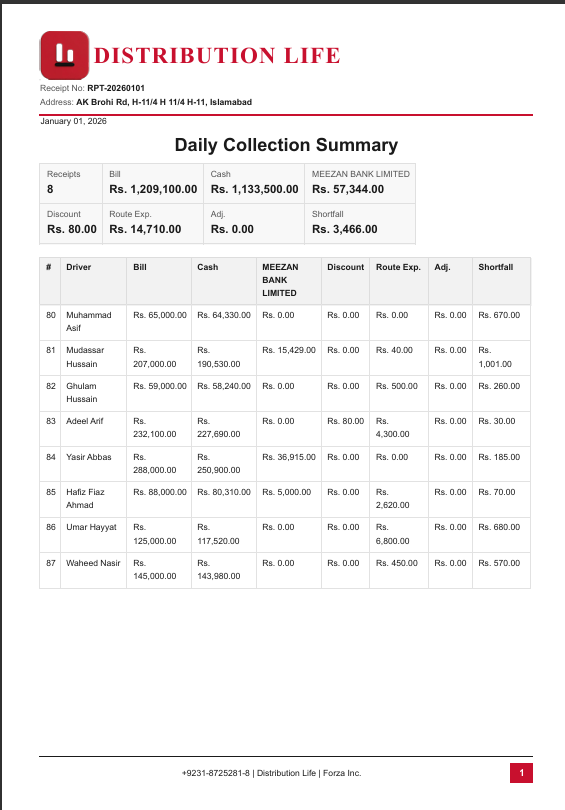
One click exports the Daily Collection Summary: every driver, total, and shortfall on one sheet.
Preview and export distributor reports.
Click Save PDF, or scroll here to watch it auto-play.
Real screens from the daily workflow: login, collections, treasury, drivers, and reports.
Daily dashboard
Collections, shortfalls, and cash on hand in one view.

Secure login
Role-based access with named user accounts.

Route collections
Capture bills, discounts, and route expenses fast.

Driver roster
Keep every driver and route accountable.

Cash & expenses
Track cash in, out, and on hand.

End-of-day report
One-page PDF ready to print and close the day.
Collections, deposits, and driver balances are in one system. End-of-day close is against documented figures.
Shop credit and inventory used to live in separate books. Now the office sees every outlet and loadout in one place.
Drivers return, collections go in, and the shortfall is clear the same afternoon. We do not wait until month-end to find gaps.
One system
One login for the office. Collections, treasury, and reports stay on the same desk.
Collection, shortfall, cash in hand, and active drivers, before the first route call.
Driver, bill, discount, cash notes, and bank deposit. One receipt, one save.
Register routes, track balances, and keep the team list ready for the next load.
Category, vehicle, and cash or bank, so treasury always matches the floor.
Cash in hand, bank balances, and the ledger update from the same day’s work.
Preview the Daily Collection Summary, then save the PDF for the file.


